 Minxing Cable
 Jinhuanyu Cable
 Jinlongyu Cable
 Guangdong Cable
 Zhujiang Wire & Cable



How Many Wires Do Network Cables Have? A Complete Guide to Ethernet Cable Wiring
If you‘ve ever looked closely at the end of an Ethernet cable, you might have noticed a row of tiny, colorful wires inside. You may have wondered: how many wires are actually in there, and what do they all do?
The short answer is eight wires. Every standard Ethernet cable — from basic Cat5e all the way up to high-performance Cat8 — contains eight individual copper conductors organized into four twisted pairs.
But that simple answer opens the door to a much more interesting story. Why eight? Why are they twisted? Does every cable really use all eight wires? And does it matter which one you buy?
Let‘s take a deep dive into the anatomy of network cables, how they work, and what you need to know to make the right choice for your home or business network.
Table of Contents
The Short Answer: 8 Wires, 4 Pairs
Why Are the Wires Twisted?
What Each Wire Pair Actually Does
Ethernet Cable Categories: Cat5e to Cat8
Shielded vs. Unshielded: What‘s the Difference?
T568A vs. T568B: The Two Wiring Standards
Do All Ethernet Cables Use All 8 Wires?
How to Choose the Right Ethernet Cable
Frequently Asked Questions
Conclusion
The Short Answer: 8 Wires, 4 Pairs
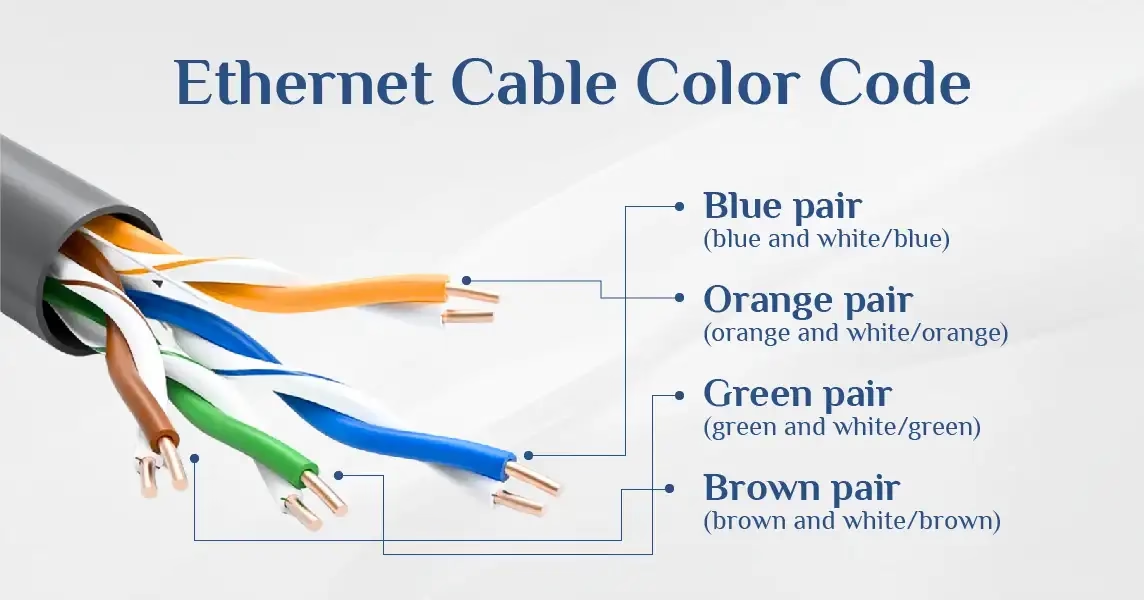
Every standard Ethernet cable contains eight individual copper wires. These eight wires are organized into four twisted pairs — meaning two wires are twisted around each other in a consistent, repeating spiral pattern.
Each end of the cable terminates in an RJ45 connector, which has eight pins — one for each wire.
Key Takeaway: Standard Ethernet cable = 8 wires = 4 twisted pairs = 1 RJ45 connector with 8 pins.
The wires are color-coded to make identification and termination easier. The four pairs are:
| Pair | Colors |
|---|---|
| Pair 1 | Blue / White-Blue |
| Pair 2 | Orange / White-Orange |
| Pair 3 | Green / White-Green |
| Pair 4 | Brown / White-Brown |
Each pair consists of one solid-colored wire and one white wire with a colored stripe.
Why Are the Wires Twisted?
The twisting is not decorative — it‘s doing essential work.
When electrical current flows through a wire, it creates a small electromagnetic field. If two wires carrying signals are placed close together, these fields can interfere with each other — a phenomenon called crosstalk.
By twisting two wires together, the electromagnetic fields they generate tend to cancel each other out. This dramatically reduces interference and preserves signal quality.
Different cable categories achieve different twist rates per inch. Cat6 cables are twisted tighter than Cat5e, which is one reason why Cat6 supports higher frequencies and performs better over longer distances.
Key Takeaway: The twist isn‘t random — it’s a precision-engineered feature that makes high-speed data transmission possible.
What Each Wire Pair Actually Does
Not all eight wires do the same job. In fact, depending on your network speed, some wires might not be used at all.
Here‘s how the four pairs break down by function:
| Wire Pair | Pin Numbers | Function | Speed Support |
|---|---|---|---|
| Orange (Pair 2) | 1-2 | Transmit+ / Transmit- | All speeds |
| Green (Pair 3) | 3-6 | Receive+ / Receive- | All speeds |
| Blue (Pair 1) | 4-5 | Bidirectional data | Gigabit+ only |
| Brown (Pair 4) | 7-8 | Bidirectional data | Gigabit+ only |
How This Works in Practice
100 Mbps (Fast Ethernet): Only the orange and green pairs are used for transmitting and receiving data. The blue and brown pairs sit idle.
1 Gbps (Gigabit Ethernet): All four pairs activate and become bidirectional, transmitting and receiving data simultaneously.
10 Gbps and above: All four pairs are used, often with higher-grade cabling (Cat6A or Cat7) and more sophisticated signal processing.
Each pair uses differential signaling — one wire carries a positive signal while its partner carries the negative version. The receiving device reads the difference between these signals, which cancels out any interference both wires picked up along the way.
Key Takeaway: For modern Gigabit networks, all eight wires matter. Don‘t buy cables that only use four wires unless you’re absolutely certain you‘ll never need more than 100 Mbps.
Ethernet Cable Categories: Cat5e to Cat8
Ethernet cables are categorized by performance standards, known as “Cat” (short for Category) followed by a number. Higher numbers generally mean better performance.
Here‘s a comparison of the most common categories:
| Category | Max Speed | Max Bandwidth | Shielding | Typical Use |
|---|---|---|---|---|
| Cat5e | 1 Gbps | 100 MHz | UTP (typically) | Home networks, basic office |
| Cat6 | 1 Gbps (up to 100m) | 250 MHz | UTP or STP | Home, office, gaming |
| Cat6A | 10 Gbps (up to 100m) | 500 MHz | Shielded recommended | Data centers, high-performance |
| Cat7 | 10 Gbps (up to 100m) | 600 MHz | Always shielded | Enterprise, future-proofing |
| Cat8 | 40 Gbps (up to 30m) | 2000 MHz | Always shielded | Data centers, short runs |
Cat5e
The most common cable in homes and small offices. Supports Gigabit Ethernet up to 100 meters. It contains 8 wires in 4 twisted pairs, typically unshielded.
Cat6
Tighter twists than Cat5e, which reduces crosstalk and allows for higher frequencies. Cat6 cables support Gigabit Ethernet and can handle 10 Gbps over shorter distances (up to 55 meters).
Cat6A
The “A” stands for “augmented.” Cat6A supports 10 Gbps over the full 100-meter distance, with improved shielding to handle higher frequencies.
Cat7
Always shielded, Cat7 cables offer excellent protection against interference. They support 10 Gbps and are backward compatible with regular Ethernet ports.
Cat8
The current top tier for copper Ethernet. Cat8 supports up to 40 Gbps over distances up to 30 meters, with a massive 2000 MHz bandwidth.
Key Takeaway: For most home users, Cat5e or Cat6 is more than sufficient. For heavy users, gamers, or future-proofing, Cat6A is a solid choice.
Shielded vs. Unshielded: What‘s the Difference?
Once you move beyond the basic twisted-pair structure, you start encountering shielding — and this is where a lot of people get confused.
Unshielded Twisted Pair (UTP)
UTP is the most widely used type in homes and small offices. It relies entirely on the twist rate to manage interference.
Pros:
Less expensive
Easier to install
Sufficient for most residential environments
Cons:
More susceptible to electromagnetic interference (EMI)
Not ideal for industrial or high-interference environments
Shielded Twisted Pair (STP)
STP adds a physical barrier around the wires to block external EMI from motors, fluorescent lighting, and other nearby cables.
Common shielding configurations:
| Type | Description |
|---|---|
| F/UTP | Foil shield around all four pairs as a group |
| S/FTP | Braided outer shield + foil around each individual pair |
| SF/UTP | Braided shield + foil around all pairs, no individual shielding |
A Critical Note About Shielding
Shielding does very little if it‘s not properly grounded.
The metallic shielding layer needs a path to ground to actually dissipate the interference it absorbs. Without proper grounding, that shielding can become an antenna and make interference worse.
Proper grounding requires:
Shielded connectors
Grounded patch panels or keystones at both ends
Verified grounding continuity
Key Takeaway: For most homes, UTP is perfectly fine. Only invest in shielded cables if you‘re in a high-interference environment and can properly ground them.
T568A vs. T568B: The Two Wiring Standards
When you terminate an Ethernet cable, you need to follow a specific wiring sequence. There are two accepted standards: T568A and T568B.
Both are defined by the TIA/EIA-568 standard, and both work perfectly fine for transmitting data. The only difference is the order in which the wire pairs are arranged within the connector.
T568B Wiring Sequence (Most Common in North America)
| Pin | Wire Color |
|---|---|
| 1 | White/Orange |
| 2 | Orange |
| 3 | White/Green |
| 4 | Blue |
| 5 | White/Blue |
| 6 | Green |
| 7 | White/Brown |
| 8 | Brown |
T568A Wiring Sequence
| Pin | Wire Color |
|---|---|
| 1 | White/Green |
| 2 | Green |
| 3 | White/Orange |
| 4 | Blue |
| 5 | White/Blue |
| 6 | Orange |
| 7 | White/Brown |
| 8 | Brown |
Which One Should You Use?
T568B is the more commonly used standard in commercial and residential installations across North America.
T568A shows up more frequently in government projects and is the default for crossover cables.
Critical Rule: Use the same standard on both ends of a cable for a straight-through patch cable. Use opposite standards on each end if you need a crossover cable.
Do All Ethernet Cables Use All 8 Wires?
Not all of them. While standard Ethernet cables contain 8 wires, some cables — especially older or cheaper ones — may only use 4 wires (2 pairs).
4-Wire Ethernet Cables
Some cables, particularly those sold as “phone cables” or very low-cost “Ethernet” cables, only contain two twisted pairs (4 wires). These cables:
Support only 100 Mbps (Fast Ethernet)
Cannot support Gigabit (1 Gbps or higher)
Are often confused with standard Ethernet cables
Why 4-Wire Cables Still Exist
Cost savings — fewer copper wires = lower manufacturing cost
Legacy compatibility — older 100 Mbps networks only needed 4 wires
Phone systems — some cables are designed for telephone use, not networking
Warning: If you‘re buying Ethernet cables for a modern network, always verify that the cable contains 8 wires (4 pairs). A 4-wire cable will bottleneck your network to 100 Mbps.
How to Check
Look at the cable‘s specifications:
Cat5e, Cat6, Cat6A, Cat7, Cat8 — all contain 8 wires
Cat3 — only contains 6 wires (3 pairs) and is obsolete for networking
If the packaging says “100 Mbps” or “Fast Ethernet” without mentioning Gigabit, it might be a 4-wire cable
How to Choose the Right Ethernet Cable
Choosing the right Ethernet cable depends on your specific needs. Here‘s a decision framework:
For Home Networking
Recommendation: Cat5e or Cat6, UTP, 8-wire
Cat5e supports Gigabit Ethernet, which is more than enough for most homes
Cat6 offers better performance and future-proofing at a slightly higher cost
UTP is sufficient for residential environments without heavy interference
For Gaming and Streaming
Recommendation: Cat6 or Cat6A, UTP or STP
Lower latency and higher bandwidth for competitive gaming
Cat6A supports 10 Gbps, useful for future upgrades
Consider STP if you have many cables running close together
For Business and Data Centers
Recommendation: Cat6A or Cat7, Shielded
Higher speeds and longer distances
Shielded cables protect against interference in dense cable runs
Cat8 for short, ultra-high-speed connections (e.g., server-to-switch)
For Outdoor or Harsh Environments
Recommendation: Outdoor-rated Cat5e or Cat6, STP
UV-resistant jacket
Water-resistant or waterproof
Shielded to protect against environmental interference
Frequently Asked Questions
1. Can I use a 4-wire Ethernet cable for Gigabit?
No. Gigabit Ethernet requires all 8 wires (4 pairs). A 4-wire cable will only support 100 Mbps.
2. Does the color order matter?
Yes. The wiring sequence (T568A or T568B) must be correct for the cable to function properly. If the order is wrong, you‘ll either have no connection or experience degraded performance.
3. Can I mix T568A and T568B on the same cable?
Only for crossover cables. For standard straight-through cables, both ends must use the same standard.
4. Why do some Ethernet cables have 8 wires but only use 4?
In 100 Mbps networks, only the orange and green pairs are used. The blue and brown pairs are spares. However, modern Gigabit networks use all 8 wires.
5. What happens if I use a Cat5e cable for a 10 Gbps network?
Cat5e is not rated for 10 Gbps. You may experience dropped packets, reduced speeds, or complete connection failure. Use Cat6A or higher for 10 Gbps.
6. Can I use Ethernet cable for PoE (Power over Ethernet)?
Yes. All 8 wires can be used for both data and power delivery. PoE typically uses the spare pairs (blue and brown) for power, though some implementations use the data pairs.
7. What’s the maximum length for an Ethernet cable?
For most categories (Cat5e, Cat6, Cat6A), the maximum recommended length is 100 meters (328 feet) for full-speed operation.
8. How can I tell how many wires are in my cable?
Check the cable‘s outer jacket for specifications. Look for:
“4 Pair” or “4 Pairs” — indicates 8 wires
“Cat5e,” “Cat6,” etc. — all contain 8 wires
If in doubt, cut the end off and count — but be prepared to terminate it again!
Conclusion
To recap the key points:
| Question | Answer |
|---|---|
| How many wires in a standard Ethernet cable? | 8 wires |
| How are they organized? | 4 twisted pairs |
| How many pins on an RJ45 connector? | 8 pins |
| Which pairs are used for Gigabit? | All 4 pairs |
| Which pairs were used for 100 Mbps? | Orange and green pairs only |
| What are the two wiring standards? | T568A and T568B |
| Which is more common? | T568B (North America) |
| What about shielded cables? | STP for high-interference environments |
| What cable should I buy for home? | Cat5e or Cat6, UTP, 8-wire |
The eight wires inside an Ethernet cable aren‘t just there for show. They’re a carefully engineered system of twisted pairs, differential signaling, and color-coded organization that makes modern high-speed networking possible.
Whether you‘re setting up a home office, running cables through your walls, or managing a data center, understanding what’s inside your Ethernet cables helps you make better purchasing decisions, troubleshoot connection issues, and get the most out of your network.
And when you‘re ready to buy high-quality Ethernet cables or any other type of copper cabling, CU CABLE has you covered with premium, GB-standard products you can trust.
Whether you need Ethernet cables, building wires, or any other copper cabling, CU CABLE delivers 100% pure copper, GB-standard products with full meterage and full weight — guaranteed.
Related posts
Categories
- Buyer's Guides (1)
- Cable Selection (7)
- Cabling (1)
- Electrical Engineering (5)
- Ethernet (1)
- Industry News (5)
- Networking (6)
- Power Distribution (2)
- Product Knowledge (1)
- Safety & Standards (1)
- Technical Guides (5)
Recent Posts



Recent Comments

Online Store for a Full Range of Wires and Cables
Who We Are
CU CABLE is the premier online destination for premium Chinese copper cables — engineered to GB standards, certified for global markets, and backed by unconditional guarantees.
We partner exclusively with China's most respected cable manufacturers: brands with 30+ years of export experience, multi-national certifications, and proven track records supplying mega-projects from airports to high-speed rail networks.
Our Mission
To bridge the gap between the world's best copper cable manufacturing and international buyers who demand quality, transparency, and value. No middlemen. No markups. No compromises.
Why China?
China produces over 40% of the world's copper cables. Our partnered manufacturers operate state-of-the-art facilities with CNAS-certified laboratories, automated production lines, and rigorous quality control systems that meet or exceed international standards.
WHY CU CABLE — THE 5 PILLARS
1. ⚡ PURE COPPER. NO COMPROMISE.
Every cable we sell is 100% pure copper conductor — no CCA (Copper-Clad Aluminum), no alloys, no shortcuts. Copper delivers superior conductivity, lower resistance, and longer service life. When you buy from CU CABLE, you get the real thing.
2. 📏 GB-STANDARD. FULL METERAGE. FULL WEIGHT.
All our cables are manufactured to strict Chinese National Standards (GB) . We guarantee 100 meters per reel — not 95, not 98. Full weight, full length. We back it with a "Short Reel = Double Refund" promise.
3. 🛡️ CERTIFIED FOR GLOBAL MARKETS.
Every product carries China Compulsory Certification (3C) . Our partnered manufacturers also hold CE (Europe), UL (US), VDE (Germany), BASEC (UK), RoHS, and REACH certifications — ensuring full compliance for North American and European markets.
4. 🔥 FLAME-RETARDANT. SAFETY FIRST.
All cables feature flame-retardant insulation with low-smoke, halogen-free options available. Engineered for both residential and commercial applications, our cables meet or exceed international fire safety standards.
5. ✅ AUTHENTICITY GUARANTEED. FAKE = 10X REFUND.
We source directly from authorized factories. Every reel is 100% authentic — traceable, verifiable, and backed by our "Fake Product = 10X Your Money Back" guarantee. No counterfeits. No bait-and-switch.


